
# IME Typing Test: Measure Conversion Speed and Accuracy
An IME typing test measures how fast you can produce final text when composition and conversion are part of the workflow. Raw keystroke speed alone misses the biggest delay for many multilingual typists: candidate window decisions. If you want practical gains, benchmark three layers separately: pre conversion keystrokes, conversion latency, and correction cost after commit.
This guide gives you a repeatable protocol, a decision table, and a weekly improvement plan you can run in TypeTest sessions.
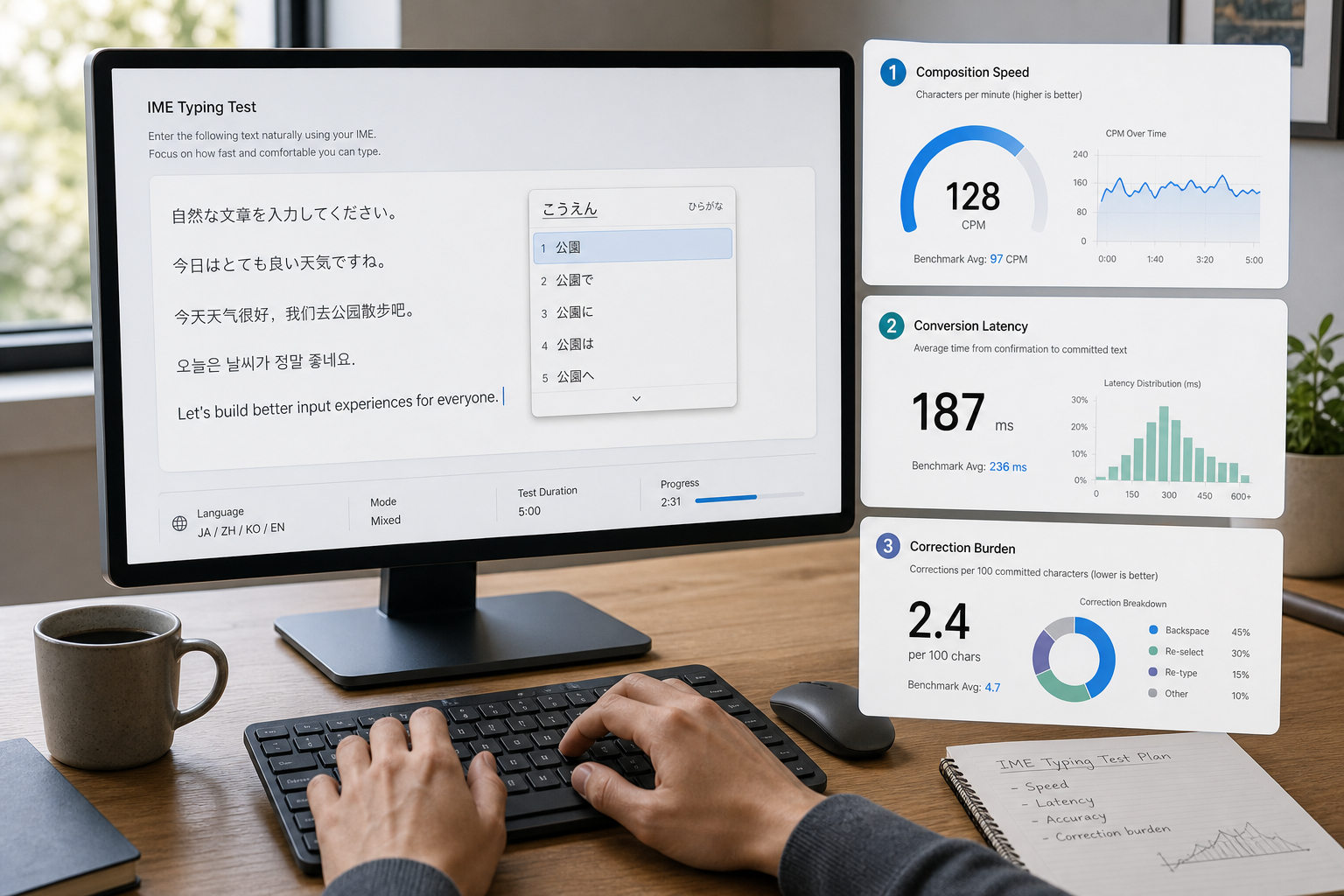
# What an IME typing test measures
An Input Method Editor converts typed phonetic or component sequences into target characters. For Japanese, this includes kana to kanji conversion. For Chinese, this includes pinyin or shape based input that resolves into hanzi choices. The output speed depends on more than key travel.
A useful IME typing test tracks three measurable stages:
- Composition speed: how quickly you enter source sequences.
- Candidate decision speed: how quickly you choose or confirm conversions.
- Post commit cleanup: how often you reopen and correct wrong conversions.
Platform behavior for composition and conversion is documented by major vendors and web standards bodies:
- Microsoft Japanese IME usage and conversion controls: https://support.microsoft.com/windows/microsoft-japanese-ime (opens new window)
- Google Input Tools and IME behavior references: https://www.google.com/inputtools/ (opens new window)
- W3C Input Events specification for composition lifecycle: https://www.w3.org/TR/input-events-2/ (opens new window)
- Unicode Technical Standard for ideographic variation and text behavior context: https://www.unicode.org/reports/tr37/ (opens new window)
# Why WPM drops when IME conversion is involved
Many typing tests score only committed characters over time. For IME users, that compresses two different problems into one number. You may type source syllables quickly and still lose output speed during conversion ranking and correction loops.
The common latency drivers are operational:
- Candidate list overload from broad phonetic sequences.
- Over aggressive prediction that commits unintended words.
- Weak personal dictionary adaptation for your domain vocabulary.
- Inconsistent shortcut use for segment expansion, shrink, and reconversion.
If you separate these drivers, your tuning becomes precise and your improvement data becomes reliable.
Related TypeTest methods you can reuse:
# 25 minute IME typing test protocol
# Step 1: Build three matched text blocks
Create three blocks of about 220 to 260 final characters each.
- Block A, low ambiguity: high frequency words and short phrases.
- Block B, medium ambiguity: mixed vocabulary with moderate homophones.
- Block C, high ambiguity: proper nouns, technical terms, and mixed scripts.
Keep punctuation density and sentence length similar across blocks. The goal is to raise conversion complexity while keeping overall reading difficulty stable.
# Step 2: Run composition only baseline
Use IME in a mode that shows composition but delays final conversion decisions as much as your workflow allows. Run two 90 second attempts on Block A.
Record:
- Source sequence entries per minute.
- Average composition segment length.
- Unintended segment breaks.
This gives a keystroke layer baseline with minimal candidate choice overhead.
# Step 3: Run full conversion block
Run three 90 second attempts each for Blocks B and C with normal conversion behavior.
Record:
- Final committed characters per minute.
- Conversion confirmations per minute.
- Candidate cycling count.
- Wrong commit count.
- Reconversion count.
Use medians, not best attempts. Median values reveal whether settings survive variance across runs.
# Step 4: Compute conversion overhead ratios
Calculate these three ratios:
- Conversion overhead ratio = composition only speed divided by full conversion speed.
- Candidate churn ratio = candidate cycling count divided by total conversions.
- Correction burden ratio = wrong commits plus reconversions divided by total committed phrases.
Interpretation bands:
- Overhead under 1.15 and low correction burden: current setup is stable.
- Overhead 1.15 to 1.35: tuning likely yields meaningful gains.
- Overhead above 1.35: workflow redesign or dictionary retraining is likely required.
# Step 5: Re test after one controlled change
Change one variable at a time:
- Candidate window orientation and size.
- Prediction level or cloud suggestion setting.
- Segment conversion shortcut mapping.
- User dictionary entries for frequent terms.
- Full width and half width symbol behavior.
Repeat Block B once and Block C once. Keep the change only if conversion overhead and correction burden both improve.
# Decision table for IME tuning
| Symptom during runs | Likely cause | First change to test | Verification signal |
|---|---|---|---|
| Frequent wrong homophone commits | Candidate ranking is weak for your domain | Add top 30 domain terms to user dictionary | Wrong commit count drops in Block C |
| High candidate cycling per phrase | Composition segments are too long | Use segment shrink and expand shortcuts earlier | Candidate churn ratio decreases |
| Good speed in simple text, collapse in technical text | Dictionary lacks domain specific nouns | Seed dictionary with project and product vocabulary | Correction burden ratio drops by at least 20 percent |
| Repeated punctuation width mistakes | Width mode switches unexpectedly | Lock punctuation width mode per app | Width related corrections approach zero |
| Conversion lag spikes in one app | App level input pipeline or extension interference | Disable conflicting extension and retest | App specific conversion overhead aligns with browser baseline |
This table translates noisy frustration into isolated experiments.
# IME calibration checklist before serious practice
Use this checklist at the start of each benchmark day.
- Confirm active input language and IME variant.
- Confirm half width and full width punctuation mode for target workflow.
- Confirm candidate selection shortcuts are consistent across apps.
- Verify space, tab, and number key candidate behaviors.
- Verify reconversion shortcut works in your main editor.
- Add or refresh high frequency domain terms in the user dictionary.
- Run a one minute smoke test on a high ambiguity sentence set.
- Log one metric from each layer: composition, conversion, correction.
Checklist discipline keeps runs comparable across days.
# Practical setup choices that change real output
# Candidate list length
Short candidate lists reduce visual scanning cost but can hide the correct choice deeper in paging. Long lists increase choice entropy. For most typists, a medium list with strict ranking performs better than maximal list length.
Operational test: run two matched blocks with two list lengths. Keep the setting that minimizes correction burden while preserving committed character rate.
# Prediction aggressiveness
Aggressive prediction can boost speed for repetitive phrases and hurt speed for mixed or technical text. The useful setting depends on your content profile.
Operational test: benchmark one conversational block and one technical block. If gains in conversational text create larger technical correction loops, keep prediction moderate and rely on dictionary seeding.
# Dictionary maintenance cadence
User dictionaries drift as your vocabulary changes. A stale dictionary inflates candidate churn.
Operational routine:
- Capture top repeated wrong commits for one week.
- Add canonical forms and preferred compounds.
- Remove obsolete or accidental entries.
- Re test with the same three block protocol.
You can apply this cadence monthly with minimal overhead.
# Common measurement mistakes in IME workflows
# Mistake 1: Treating raw keystrokes as final output speed
Raw entry speed explains only the composition layer. Final output requires conversion and correction metrics. Use all three layers for decisions.
# Mistake 2: Testing only low ambiguity text
Low ambiguity blocks can hide candidate ranking weaknesses. Include at least one high ambiguity block in every benchmark cycle.
# Mistake 3: Mixing app contexts in one dataset
Browser text fields, IDE editors, and document tools can handle composition differently. Keep app context consistent for each run set, then compare app profiles separately.
# Mistake 4: Changing multiple settings after one bad run
Bulk changes prevent root cause attribution. Use single variable experiments and retain only changes that improve both speed and correction burden.
For testing structure and repetition control, these TypeTest posts remain useful:
# Weekly IME improvement plan
Use this seven day loop for two weeks.
Day 1:
- Run the full three block benchmark.
- Record overhead and correction ratios.
- Select one tuning variable.
Day 2:
- Build a 50 phrase personal corpus from real work.
- Mark phrases with repeated wrong commits.
- Update dictionary entries.
Day 3:
- Run Block C in your main work app.
- Log app specific conversion lag and reconversion events.
Day 4:
- Re run full benchmark after one setting change.
- Compare medians to Day 1.
Day 5:
- Practice segment control shortcuts for 15 minutes.
- Run one medium ambiguity validation block.
Day 6:
- Clean dictionary entries with accidental commits.
- Validate punctuation width mode consistency.
Day 7:
- Run final benchmark set for the week.
- Keep or revert the tested setting.
- Carry forward only changes with measurable improvement.
A short cycle with strict logging produces stable gains and avoids random tweaking.
# Reusable IME benchmark template
Copy this template into your notes for each run.
- Date:
- Language and IME:
- App context:
- Block type:
- Composition entries per minute:
- Committed characters per minute:
- Candidate cycling count:
- Wrong commits:
- Reconversions:
- Conversion overhead ratio:
- Correction burden ratio:
- Single change tested:
- Keep or revert:
Template driven records make month to month comparisons straightforward.
# When to redesign workflow instead of tuning settings
Use workflow redesign when three conditions persist for two weekly cycles:
- Conversion overhead ratio remains above 1.35.
- Candidate churn stays high after dictionary cleanup.
- High ambiguity blocks remain correction heavy in your primary app.
Redesign options include narrower segment entry habits, different IME variant choice, and domain specific phrase training. Continue with setting tweaks when overhead trends downward and correction burden falls with single variable adjustments.
# Conclusion
An IME typing test should measure final output, not only keystroke velocity. Separate composition speed, conversion latency, and correction burden. Run matched text blocks, use median metrics, and apply one controlled change at a time. This method turns multilingual typing improvements into a measurable process you can repeat inside your regular TypeTest routine.
If you keep weekly records with the template above, your gains will show up in real writing and editing tasks, not only in simplified benchmark text.